Beta Waitlist Now Open

Your money
deserves better
than a guess.

See what's truly safe to spend, what's coming next, and whether you're actually improving — not just what your balance says.

Most apps track your money. Ut Finance interprets it.

Beta launching soon. Early signups get first-wave access.

Join the waitlist to receive an invite. Sent in small batches to maintain stability.

Android Available
iOS Coming Soon
9:41
96
Ut Finance home screen showing Guardian status and financial overview
Honest Tells it like it is. No hype, no panic. Just the truth about your finances.
Connected Core features share context, so your tools work from the same financial picture.
Automated From receipt image to review queue without blocking you.
Private by choice No bank sync. On purpose. Local-first — your data is yours to control.
Zero Friction

Log an expense
before you leave
the counter.

Three fast capture paths. Confirmed entries feed the same budget view.

~5 sec

Quick Expense

Tap the shortcut. Amount, category, optional note. Done before the card reader beeps. Nothing else needed.

Open Amount Category Logged ✓
Dump and Review Later

Batch OCR

Have a week's worth piled up? Queue a stack of receipts in one session. The pipeline runs in the background — you come back to a review queue, not a chore.

Queue Run Review ✓

All three paths land in the same system. Guardian can factor in confirmed entries once they land.

Receipt Intelligence

Snap one receipt, or queue a stack. Same review flow.

Quick Snap and Batch OCR are not separate chores. They are two capture paths into the same OCR lane, ending in a parsed expense you only need to confirm.

Single receipt Snap at the counter
or
Batch stack Queue the pile later
Review queue Parsed and ready
Batch OCR queue showing receipts in processing, completed, and enqueued states
Input Queue

One receipt or a stack, both land here. Processing, completed, and waiting states stay visible.

Parsed receipt showing merchant, line items, category, and locked exchange rate after saving
Parsed Result

Merchant, amount, line items, and category are extracted for review. Transaction-date exchange rate is locked when saved.

Who It's Built For

Built for a specific
kind of person.

01

You've been here before.

You've tried other apps and spreadsheets. Something always fell apart — too tedious, too abstract, or so automated you stopped paying attention. You know what a good budgeting app should feel like. You just haven't found it. When you're ready to switch, your history comes with you.

02

You want understanding, not just data.

Pie charts don't change behaviour. Knowing your dining budget is at 82% doesn't tell you if that's a problem. Ut Finance tells you what the numbers actually mean — and what, if anything, to do about them.

03

You'll spend 10 seconds to gain real clarity.

I don't sync your bank. You log your own expenses. That's not a limitation — it's how the system knows you're paying attention. If that sounds right, you're exactly who I built this for.

Core System

Everything important,
grouped by outcome.

The app has depth, but the point is simple: capture your money, plan around reality, and know what to do next.

Money Hub

Multi-wallet, shared wallets, assets, debts, and multi-currency FX rolled into one financial picture.

Plans Built From Reality

Budgets, goals, Wizard-generated plans, and shopping lists built from your actual income, commitments, and history.

Receipt Intelligence

Quick Snap, Batch OCR, line items, merchant details, and review queues without blocking your day.

Guardian & Health

A live health score, budget monitoring, anomaly alerts, and context-aware guidance before drift becomes damage.

Point-of-Purchase Tools

Quick Expense, Quick Snap, and Can I Afford This keep decisions fast when you are actually spending.

Foresight & Reports

Upcoming bills, scheduled income, reports, cash-flow projection, and trend detection in one forward-looking loop.

Wizards

Dynamic budgets, savings goals, and event plans — generated from your actual finances, not templates.

Can I Afford This?

Scan a price tag. Get an honest answer based on your real cash flow, budget, and goals.

Insights & Reports

Spending heatmaps, auto-generated analysis reports, and pattern breakdowns — so you see the trend, not just the transaction.

Net Worth & Health Score

Your complete financial picture — assets, liabilities, and a live health score that grades your stability and spending discipline.

Upcoming Bills & Scheduling

Recurring bills, scheduled income, and auto-detected payment patterns — so you can see more of what's coming before it hits your wallet.

Shared Wallets

Money together.
No awkward
conversations.

For Families

One wallet, one shared balance. The owner sets the rules, and members can submit expenses through the shared-wallet flow.

For Couples

Share a household wallet while keeping personal ones separate. Guardian watches the shared balance the same way it watches your own.

For Small Teams

Expense tracking without a finance department. Owner-authoritative requests keep the ledger controlled while members can still send updates.

Shared wallets in Ut Finance aren't a workaround. They're a first-class feature built into the same system everything else runs on.

Home Expenses
$1,840.00
Y
P
2 members
Groceries — $64.20
Electric bill — $120
Home Expenses
$1,840.00
Y
P
In sync ✓
Groceries — $64.20
Electric bill — $120
Coherence

One System.
One Brain.
Everything Connected.

Most finance apps are feature lists. Ut Finance is a system. Guardian uses the same budget pressure the Wizard works from. The Assistant works from the same financial summaries your records create. Your goals know your wallet balances. Upcoming bills are visible before they hit. "Can I Afford This?" runs against live data — not a guess.

The major workflows share context, so decisions are made from the same records instead of isolated feature silos.

Your Finances Budgets & Goals Receipts & OCR Guardian & Alerts Assistant & Chat Shared Wallets Lists & Wizards Goals & Plans Wallets & Funds
Philosophy

Straight Talk.
No Spin.

Most apps cheer when you earn more and panic when you spend big. I don't.

"A one-off freelance payment isn't a trend. I won't pretend it is."
"A big annual expense isn't a crisis. Context matters. I read it."
"Real financial guidance means telling you the truth about your patterns — not about your last transaction."

Think of it as a direct financial check-in on your phone: grounded in your records, honest about tradeoffs, and less dramatic about one-off noise.

No bank sync. On purpose.

Bank sync sounds convenient. But when transactions appear automatically, you stop reading them. You stop noticing. You lose the awareness of where your money actually goes.

Ut Finance is built for people who want to understand their finances — not just see a number. Logging your own expenses, even for 10 seconds, keeps you conscious. That's the point.

It's also your privacy. I don't touch your bank credentials. I don't handle your account data. Your financial records stay local to your device by default. Limited administrative metadata and requested AI-processing data may be handled by service providers only as needed to operate the app.

01
Financial Awareness
02
Conscious Spending
03
Your Privacy
Built-in Smarts

Not Buzzwords.
Just things that work.

Wizards

Not a template. A plan built on your numbers.

Budget Wizard reads your income, spending history, and goals — then generates a personalised budget across every category you actually use. Want to adjust something? Hit Negotiate and it'll re-evaluate your request against the math. Event Planner works the same way: tell it what you're planning and it maps the financial impact across your timeline.

Guardian

The answer to "am I okay?" — kept in view.

Most apps make you check. Guardian keeps watch as your data changes. It monitors budget pressure in the background — not just snapshots, but patterns over time. It tracks stability across weeks, remembers what it flagged before, and follows up if the picture changes. A green chip means no immediate issue is detected. Amber means it is watching. It reads context, not just numbers — a big one-off expense does not trigger a panic. Persistent drift can. And when it speaks, it sounds like how you want to be spoken to.

Receipt Intelligence

Scan. Confirm. Done.

Point your camera, and Gemini-powered OCR reads the receipt — merchant, amount, line items, and category — then puts it in review. Merchant address comes from the receipt itself, not from your device location. Already have a stack to catch up on? Batch mode lets you queue receipts for background processing.

AI receipt processing is powered by the Google Gemini API.

Assistant

Knows your finances. Does the work.

Ask anything. The assistant reads your Financial DNA — a distilled behavioural fingerprint of your spending patterns — so its answers are calibrated to you, not a generic user profile. It uses supported summaries, runs supported app actions, and keeps the math grounded in your records. No copy-pasting, no re-entering. Choose from built-in personas or create your own.

Real Screens

See how it
actually works

Built for real-world finances, not theory. Captured from a real device, real data.

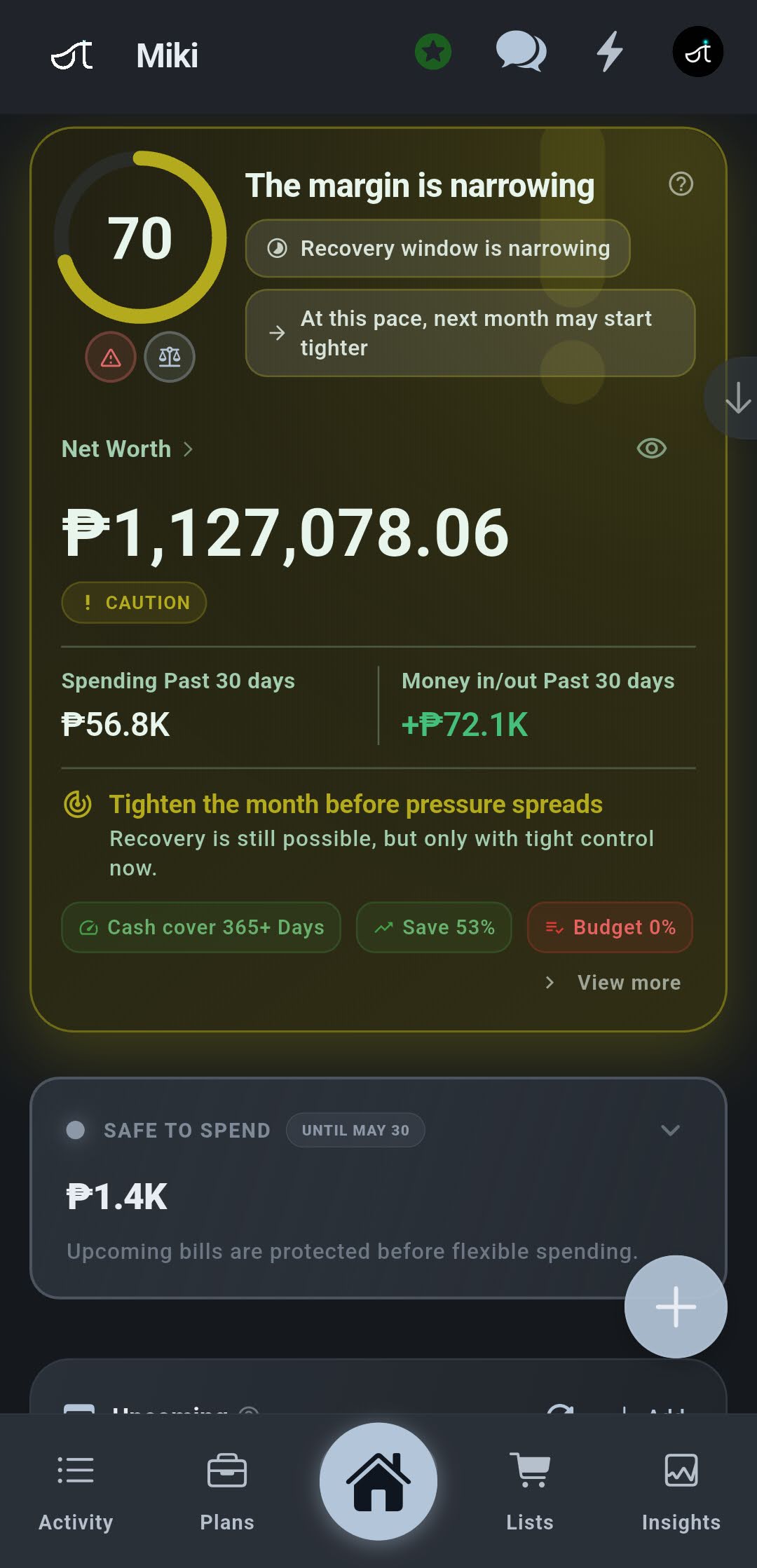
Your real financial state — not just balances
Ut Finance full home screen showing Guardian status, commitments, spending breakdown, accounts and recent transactions
Guardian — honest monitoring Health score, stability vs. behaviour, and a clear next action. Not a notification. A verdict.
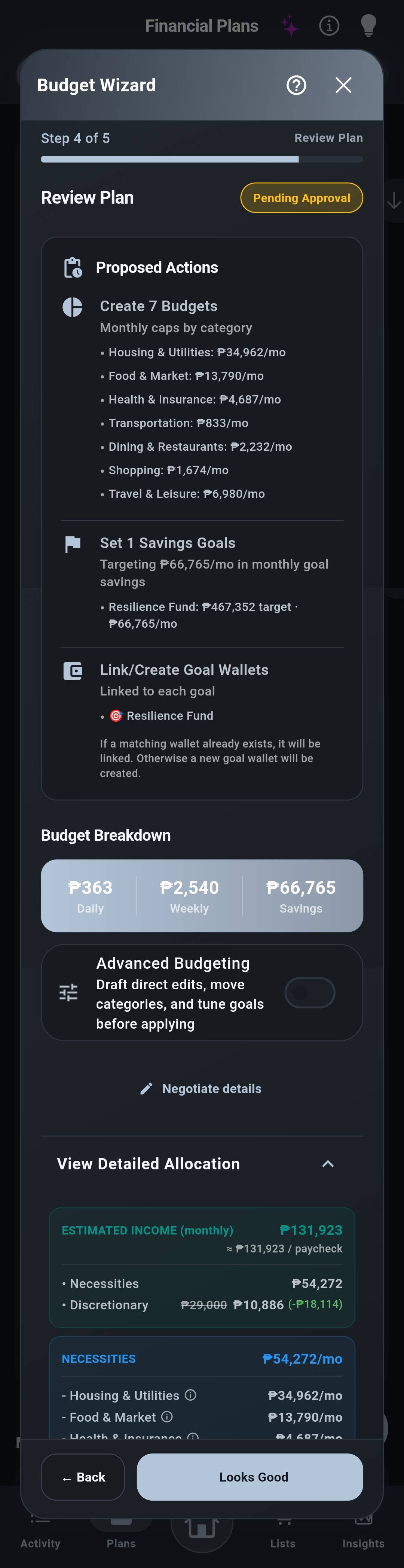
Budgets generated from your actual behavior
Budget Wizard review plan showing proposed budgets, savings goals, and negotiate option
Budget Wizard — generated plan 7 budgets, a savings goal, linked wallets — built from your real history. Pending your approval. Negotiable.
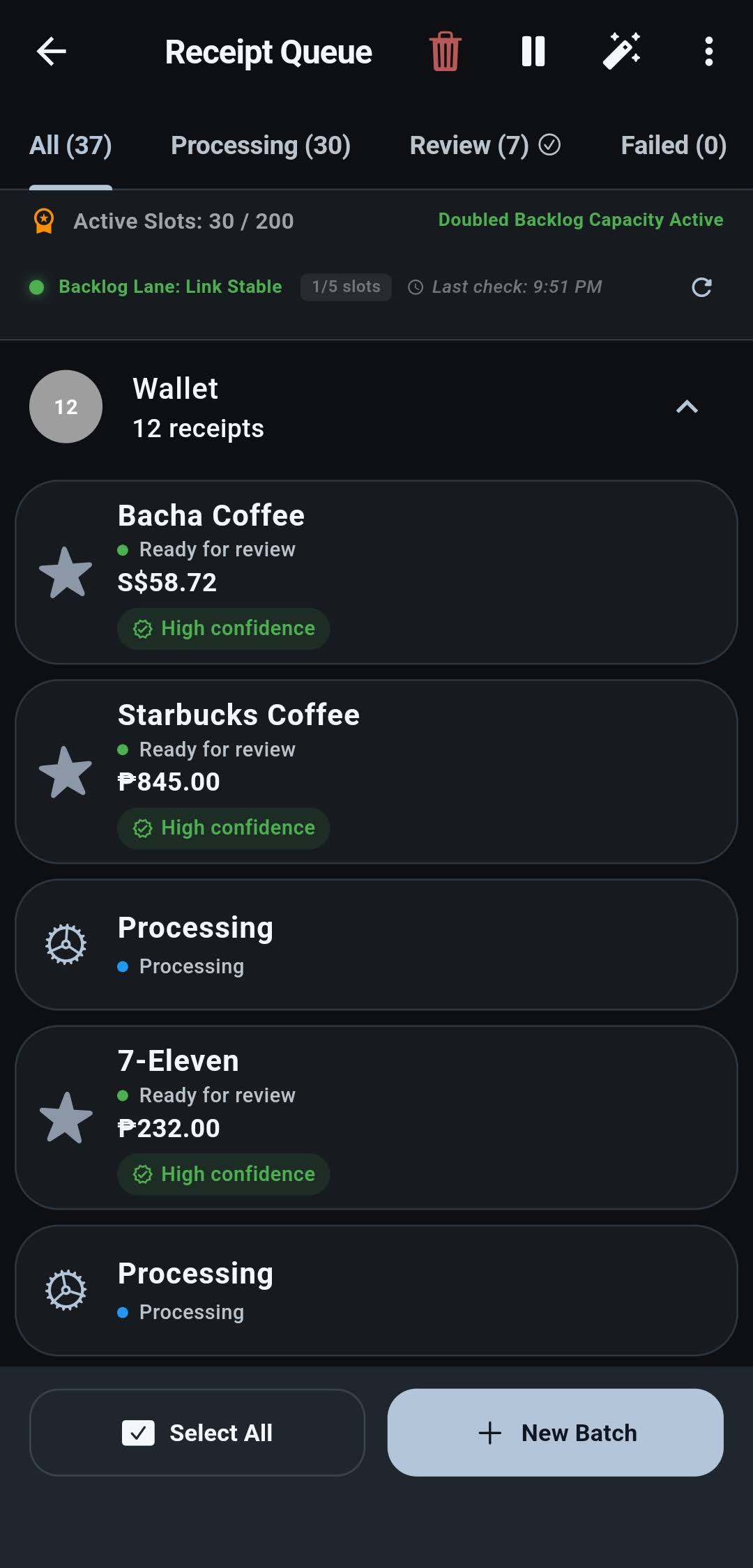
Queue a stack and let Batch OCR run
Batch OCR queue showing receipt scans in processing, completed, and enqueued states
Batch OCR — queue and process Drop in a stack of receipts, keep moving, and let the background pipeline work through them without blocking your day.
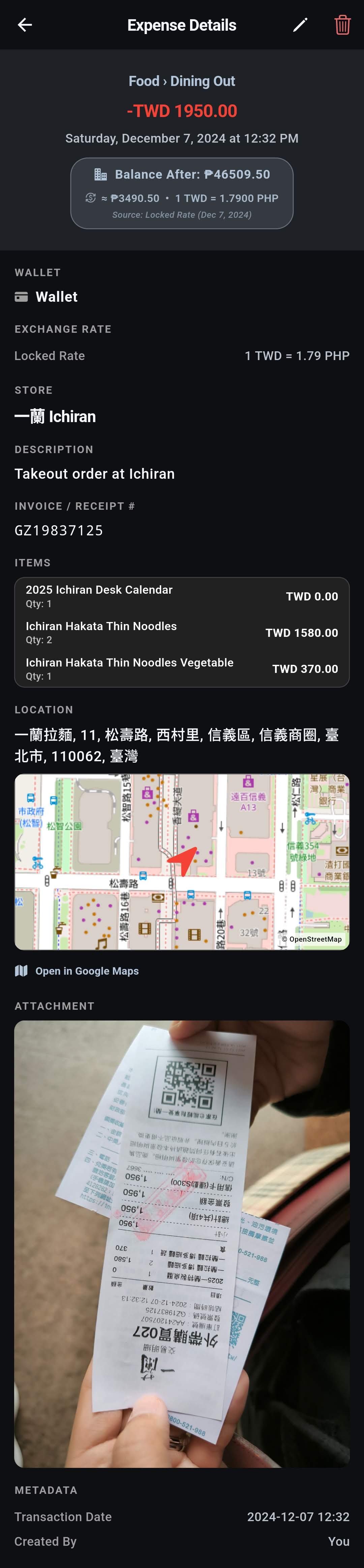
From receipt to structured review
Parsed receipt expense detail showing merchant, line items, locked exchange rate, and location map
Receipt — fully parsed Each queued receipt lands in review with merchant, line items, category, and transaction-date exchange rate ready before saving.
The Core Loop

Plan. Shop.
Done.

What using Ut Finance looks like on a normal day.

Shopping List
Grocery Run · This Saturday 5 items
🥩 Chicken breast~$14
🥛 Milk × 2~$5
🥚 Eggs~$5
🥖 Bread~$4
🫙 Greek yoghurt~$6
In Progress · Grocery Run
Chicken breast $13.80
Milk × 2 $5.40
Eggs $4.90
Bread ~$4
Greek yoghurt ~$6
All Done · Convert to Expense
Grocery Run · Completed 5/5 ✓
Total $36.45
Category 🛒 Groceries
Wallet Checking
Log This Shop →
$36.45 added to Groceries budget
Guardian · Budget Update
Groceries — April
● On Track
Groceries
79%
↑ Updated just now · $101 remaining
Groceries at 79% with 9 days left. You're on pace — no action needed.
Next Up ⟳
Groceries — budget remaining
$101 of $480
9 days left in the month. Pace is fine.
Start next list?
Your budget's updated. The list starts with the same awareness.
New Grocery List →

Most days, Ut Finance takes under a minute. The awareness it builds stays with you.

The Waitlist is Open

Join the waitlist
for early access.

Slots are limited as I scale the infrastructure. Early signups get priority and founding user benefits that stay for life.

First look before public launch
Direct line to the developer — your feedback shapes what ships
Founding user status — access benefits locked in permanently
Android Available Now
iOS Coming Soon

No spam. Beta invites and launch updates only.

Built for real-world finances, not theory.